
Appearance
VMware as a Source Cloud
Migrating (CMaaS) from vSphere/ESXi
Migrations from VMware vSphere or VMware ESXi operate in the same way Replicas do and thus entail the same requirements and steps described below.
Replicating (DRaaS) from vSphere/ESXi
Requirements:
When replicating VMs from VMware vSphere/ESXi, Coriolis uses Changed Block Tracking (CBT) to efficiently identify and transfer changed disk blocks between Transfer Executions. The initial Transfer Execution creates a snapshot of the source VM and retrieves the disk contents from the snapshot. Subsequent Transfer Executions can use CBT to transfer only the blocks that have changed since the previous execution.
The following requirements apply when replicating VMs from VMware vSphere/ESXi:
- CBT must be available to the vSphere user whose credentials are configured in Coriolis.
- The vSphere user configured in Coriolis must have:
- Read-only access to the VMs being replicated.
- Permissions to create and delete VM snapshots on the VMs being replicated.
- Read-only access to the properties of the infrastructure associated with the VMs, such as datastore properties, datastore names and IOPS, and Distributed Virtual Switch (DvS) VLAN information.
- Read-only access to the VMs being replicated.
- The VM’s disks must be hosted on CBT-compatible datastores, such as VMFS or NFS.
- Disks must be configured in Dependent disk mode.
- The VM must not use Raw Device Mappings (RDMs).
- CBT must be enabled on all disks for incremental synchronization to be used. CBT is represented by the ctkEnabled flag, which must be set to True for each source disk.For information about enabling CBT, see VMware’s official knowledge base.
- Coriolis can optionally be configured to enable CBT automatically on the source VM. Automatic CBT enablement is supported only when the source VM has no pre-existing snapshots.
- The VM must have the VMware guest agent installed and running when filesystem quiescing is required during the snapshot process.
Steps performed by Coriolis:
- read the instance configuration on the source vSphere (hardware information, disks, etc…)
- if configured to enable CBT itself, Coriolis will create and remove a temporary snapshot for the CBT data to be refreshed
- Create crash-consistent CBT snapshots of all of the instances’ volumes. If this is not the first replica execution, incremental snapshots are performed
- fetch backup data from the CBT snapshots via the CBT API
After the above steps are completed, the written blocks of the CBT snapshot will be transferred and written to disks on the destination via the destination cloud plugin
Disks that do not support CBT
Some VMDKs cannot use CBT, including shared disks and disks configured in Independent disk modes. These disks can still be exported by Coriolis, but incremental synchronization is not supported for them.
For VMs containing such disks, the following requirements apply:
- The source VM must be powered off during the Transfer Execution.
- The affected disks are transferred in their entirety during every Transfer Execution.
- Other disks that support CBT can still use incremental synchronization.
As a result, VMs containing non-CBT-compatible disks can still be replicated, but subsequent Transfer Executions may require significantly more data to be transferred than those involving only CBT-compatible disks.
Disk Export Mechanisms
Coriolis supports two mechanisms for exporting VMware virtual disks:
- OpenVixDiskLib — This is the default export mechanism. OpenVixDiskLib is Coriolis’s own implementation of the VixDiskLib interface and is included in the Coriolis appliance. No additional installation or configuration is required.
- VMware VDDK — Coriolis can alternatively use VMware’s official Virtual Disk Development Kit (VDDK). Using VDDK requires the user to download and install VDDK separately in the Coriolis appliance and configure Coriolis to use it.
Note: Before configuring Coriolis to use VDDK, follow the VDDK setup guide to download, install, and configure the required VDDK components in the Coriolis appliance.
Additional Requirements and Considerations
- VM input path: When specifying the source VM, use its slash-separated inventory path, starting with the datacenter name. For example:
- DC1/somevmfolder/The VM
- For VMs located directly under the datacenter, the datacenter name can be omitted: The VM
- DC1/somevmfolder/The VM
- ESXi host name resolution: The Coriolis virtual appliance must be able to resolve the FQDNs of the ESXi hosts registered with vSphere. If DNS resolution is not available, you can manually add the required FQDN entries to the Coriolis appliance’s hosts file using the Coriolis console interface.
- Network connectivity: Ensure that the required network connectivity between the Coriolis appliance and the VMware infrastructure is available. See the Network Ports Requirements page for the required ports.
- Static IP preservation: If the migration is configured to keep the static IP addresses, VMware Tools must be installed and available on the source VM. The VM must also be powered on at least once while Coriolis collects VM information from the source VM (which happens on any Transfer Execution or Transfer Update). If the VM is required to be powered off for transfer, users must use the Shutdown Instance execution option instead of manually shutting down.
- Third-party backup software: If third-party backup software uses or locks VSS on Windows source VMs, consider temporarily pausing the backup software for the duration of the migration. This includes backup solutions that install an agent inside the Windows VM.
Before creating and executing a Replica or Migration from vSphere, review the recommended pre-migration steps to ensure that the source environment is properly prepared.
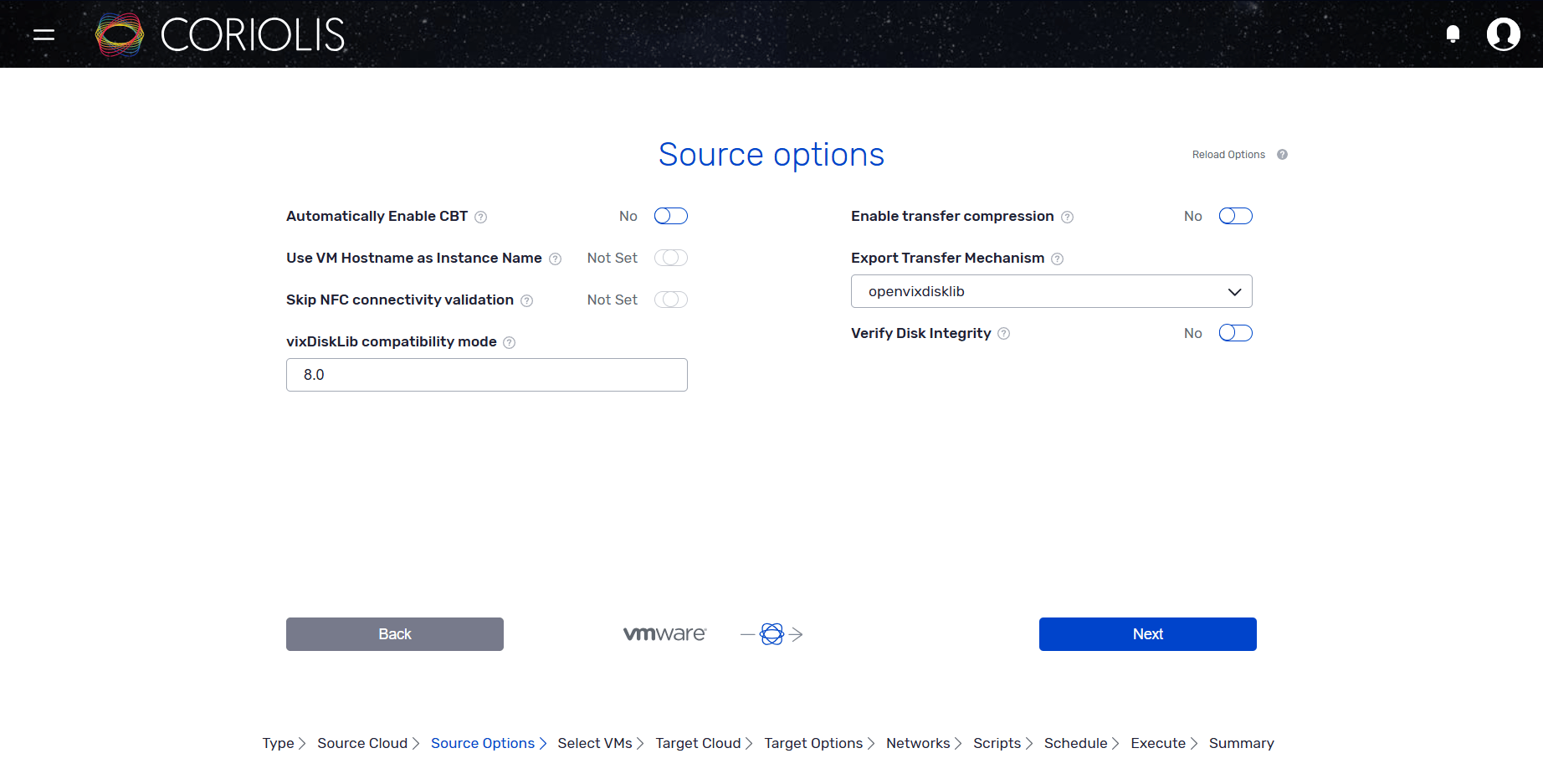
VMWare source environment parameters
OSMorphing steps taken when migrating/replicating from vSphere/ESXi
The following notable steps will be performed as part of the OSMorphing process when migrating/replicating an instance away from VMWare:
Linux:
- uninstall the VMWare guest tools
- rebuild initrd on RHEL-based systems
Windows:
- uninstall the VMWare guest tools and drivers
For more information regarding the Coriolis Worker template, please check the Coriolis Temporary Migration Worker page.
Required permissions in vCenter
For role isolation purposes, we highly recommend creating a new service role in vCenter. This role will then be assigned to a new service user who will be used in Coriolis.
When having VMware as a source platform, the role of the user account given to Coriolis must have the following privileges:
| Object | Required Privilege** | Required on | Requirement | Motivation/observation |
|---|---|---|---|---|
| Datacenter | Read-only* | The Datacenter object(s) to be migrated from | required | Listing the VM inventory of the DC |
| Datastore | Read-only* Datastore > Browse Datastore | The Datastores which host the VM’s disks | optional | Identifying which disk came from which datastore. Storage backend mapping features will not be available without it |
| Network | Read-only* | The Networks connected to the VM’s NICs | required | Identifying which interface came from which network |
| Distributed switch | Read-only* | The DVSes connected to the VM’s NICs | required | Identifying DvS Port Groups and associated information |
| dvPort group | Read-only* | The DVPGs connected to the VM’s NICs | required | Identifying DvS Port Groups information |
| Virtual Machine | Virtual Machine > Toggle Disk Change Tracking | The VM(s) which are to be migrated | optional | Required for automatically enabling Changed Block Tracking (CBT). Can be skipped if CBT is already enabled |
| Virtual Machine | Virtual Machine > Allow virtual machine download | The VM(s) which are to be migrated | required | Required for exporting the data of the VMs’ disk(s) |
| VM Power State | Virtual Machine > Power Off | The VM(s) which are to be migrated | optional | Required for automatically powering source VMs off before Migrations. |
| Snapshot | Virtual Machine > Create/Remove Snapshot | The VM(s) which are to be migrated | required | Required for the creation and cleanup of temporary VM snapshots |
| Disk | Virtual Machine > Allow read-only disk access | The disks of the VM(s) which are to be migrated | required | Required for exporting the data of the VMs’ disk(s) |
- * for most resource types, “Read Only” access is implicitly obtained by simply assigning any role to the user on the object in question. (regardless of the privileges declared within the role)
- ** The privilege labels and PyVMOMI privilege IDs are for VMware 6.7. Older VMWare releases may have slightly different permission name labels.
Configuration Options
Below is a listing of the configuration section needed when migrating from VMWare vSphere/ESXi:
Configuration options for VMWare vSphere/ESXi as a DRaaS source
| 1 2 3 4 5 6 7 8 9 10 11 12 13 14 15 16 17 18 19 20 21 22 23 24 25 26 27 28 29 30 31 32 33 34 35 | # Which mechanism to use to read VM disk data during export. 'vddk' # reads directly via the VDDK library (must be provided by the user). # 'openvixdisklib' uses an alternative implementation included with # Coriolis, avoiding VDDK licensing constraints. (string value) # Possible values: # vddk - <No description provided> # openvixdisklib - <No description provided> export_transfer_mechanism = openvixdisklib # Absolute path to directory containing the SOs/DLLs for vixDiskLib # and its dependencies, as taken from the VDDK release. (string value) vixdisklib_library_directory = /usr/lib/vmware-vix-disklib # The vSphere version for which to initialize vixDiskLib.Must be # formatted as 'Major.Minor' (ex: '6.0') (string value) vixdisklib_compatibility_version = <None> # Whether or not Coriolis should attempt to automatically enable CBT # on the VM before Replication. This requires that the VM have no pre- # existing snapshots. (boolean value) automatically_enable_cbt = false # Path to the vixdisklib configuration file. (string value) vixdisklib_config_location = <None> # Whether or not to use the hostname of the exported VM as the # migrated VM's name, in order to more easily identify it. (boolean # value) export_hostname_as_instance_name = false # Whether or not to skip pre-export NFC connectivity validation # against ESXi hosts. When false (default), Coriolis validates TCP/902 # reachability for hosts that may be selected by vCenter for # NBD/NBDSSL snapshot transfers. (boolean value) skip_nfc_validation = false |
|---|
The source environment parameters are a set of source-cloud-specific parameters that offer some extra options to the migration/replication process on a per-VM basis.
Below is a listing of the source environment parameters the VMware plugin supports when migrating/replicating a VM from vSphere/ESXi:
Example of source environment JSON to be passed to the VMWare plugin
| 1 2 3 4 5 6 7 8 9 | { "export_transfer_mechanism": "openvixdisklib", "vixdisklib_compatibility_version": "8.0", "automatically_enable_cbt": false, "verify_disk_integrity": false, "export_hostname_as_instance_name": false, "enable_transfer_compression": false, "skip_nfc_validation": false } |
|---|
- export_transfer_mechanism (string) – Which mechanism to use to read VM disk data during export. ‘vddk’ reads directly via the VDDK library (must be provided by the user). ‘openvixdisklib’ uses an alternative implementation included with Coriolis.
- vixdisklib_compatibility_version (string) – The vSphere version for which to initialize vixDiskLib.
- automatically_enable_cbt (boolean) – Whether or not Coriolis should attempt to automatically enable CBT on the VM before Replication.
- verify_disk_integrity (boolean) – Whether or not to compute source-side checksums for each disk and enable end-to-end source/destination checksum verification.
- export_hostname_as_instance_name (boolean) – Whether or not to use the hostname of the exported VM as the migrated VM’s name, in order to more easily identify it.
- verify_disk_integrity (boolean) – Whether or not to compute source-side checksums for each disk and enable end-to-end source/destination checksum verification.
- enable_transfer_compression (boolean) – Whether or not to enable transport level compression when retrieving disk data. Can speed up the transfer if the data is compressible and the connection is slow. Avoid using compression when migrating encrypted disks.
- skip_nfc_validation (boolean) – Whether or not to skip pre-export NFC connectivity validation against ESXi hosts. When unset, the Coriolis worker configuration default is used. When false, Coriolis validates TCP/902 reachability for hosts that may be selected by vCenter for NBD/NBDSSL snapshot transfers.