
Appearance
qemu-img for Windows
QEMU disk image utility for Windows. It is used for converting, creating, and consistency checking of various virtual disk formats. It is compatible with Hyper-V, KVM, VMware, VirtualBox, and Xen virtualization solutions. This build has been optimized for Windows Server (x64).
Usage examples
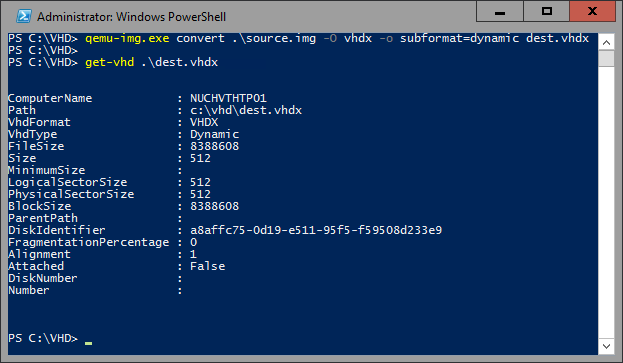
Convert a QCOW2, RAW, VMDK or VDI image to VHDX
| 1 | qemu-img.exe convert source.img -O vhdx -o subformat=dynamic dest.vhdx |
|---|
Convert a QCOW2, RAW, VMDK or VDI image to VHD
| 1 | qemu-img.exe convert source.img -O vpc -o subformat=dynamic dest.vhd |
|---|
Subformat can be either “dynamic” or “fixed” for VHD (vpc) or VHDX.
Note: use the fixed VHD subformat for Azure, the conversion will automatically take care of the required 1MB virtual size alignment.
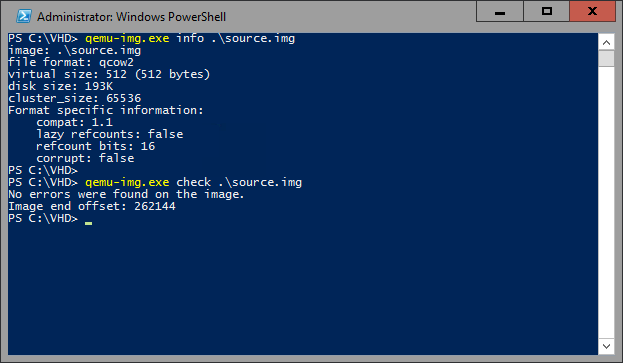
Check a virtual disk for consistency
| 1 | qemu-img.exe check source.qcow2 |
|---|
Get info about a virtual disk
| 1 | qemu-img.exe info image.qcow2 |
|---|
Run qemu-img.exe -h or see the manual page for a complete list of all supported options.
Supported formats
| Image format | Argument for -f and -O options |
|---|---|
| VMDK (VMware) | vmdk |
| QCOW2 (KVM, Xen) | qcow2 |
| VHD (Hyper-V) | vpc |
| VHDX (Hyper-V) | vhdx |
| RAW | raw |
| VDI (VirtualBox) | vdi |
Download binaries
Links
Source code: https://github.com/cloudbase/qemu
QEMU’s project main page: http://www.qemu.org
Alternative QEMU binaries: http://qemu.weilnetz.de/
Documentation: https://qemu.weilnetz.de/doc/